


Introduction to XM
XM is a globally recognized online trading platform trusted by millions of traders worldwide. Offering access to forex, stocks, commodities, and CFDs, XM provides user-friendly tools, competitive spreads, and a secure environment for both beginners and experienced traders. If you’re ready to start trading, follow this simple guide to open your XM account today.
Step-by-Step Guide to Opening an XM Account
Step 1: Click the “Open XM Account” button below
Tip: After accessing, you can change the language at the top.
Step 2: Fill Out the Registration Form
Here’s what you’ll need to provide:
- Country of Residence
- Password
If you agree to receiving a newsletter, company news and product updates, tick the box.
Then click “Register“

Step 3: Verify Your Email and Phone Number
After completing step 2, XM will send a verification link to your email. Click the link to activate your account.

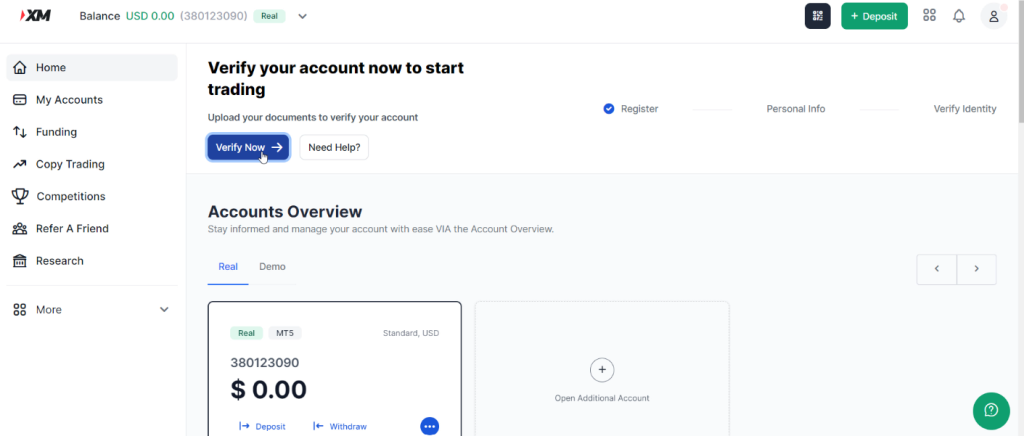
Verify your account to start trading
Click “Verify Now” to start
Let’s add your profile details
Please fill in your name, date of birth and phone number.
After filling in the information, click “Continue“

Next, fill in some address information that XM requires.
In the postal code section, you can search for your postal code on the internet.
When you’re done, click “Add Financial Details“

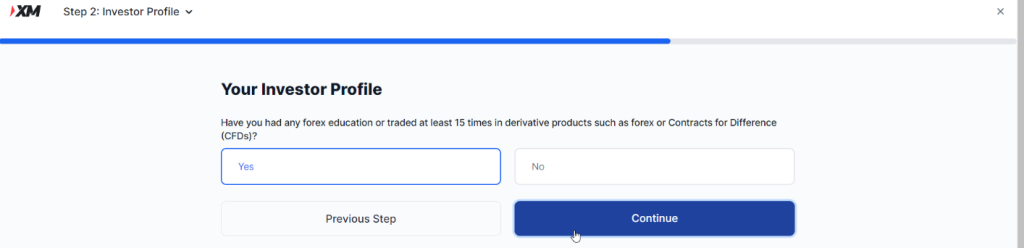
Next, You need to answer a question: Have you had any forex education or traded at least 15 times in derivative products such as forex or contracts for difference?
You can select Yes or No
Then, click “Continue“
Step 4: Complete Your Profile and Upload Documents
To comply with financial regulations, XM requires identity verification. Click “Start verification“

Verification:
- A valid government-issued ID (passport, driver’s license, or national ID).
- A proof of address (utility bill or bank statement dated within the last 6 months).
XM typically approves documents within 1–2 business days.
Step 5: Choose Your Account Type
XM offers multiple account types to suit different trading styles:
- Standard Account: Ideal for beginners, with no commissions and flexible lot sizes.
- XM Ultra Low Account: Features tighter spreads for cost-sensitive traders.
- Shares Account: Trade real stocks with zero commissions.
Select the account that aligns with your goals and experience level. To view your accounts go to “My Account”

Step 6: Deposit Funds
Once verified, fund your account to start trading:
- Go to the “Funding” section in your dashboard.
- Choose a payment method (credit/debit card, bank transfer, e-wallets like Skrill/Neteller, …).
- Enter the amount (minimum deposit starts at $5 for most accounts).

Step 7: Download the Trading Platform
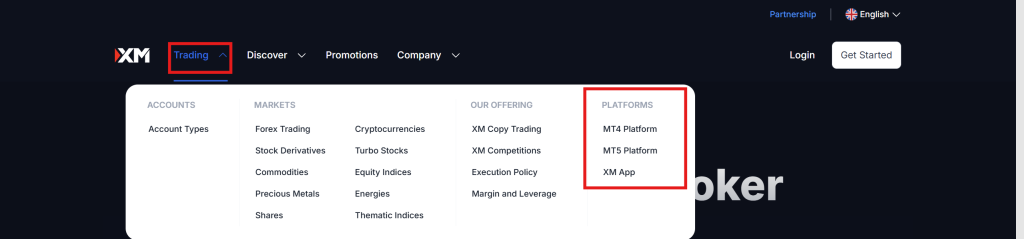
XM supports MT4 and MT5, the industry’s leading trading platforms. Download your preferred platform:
- Desktop: Install directly from the XM website.
- Mobile: Available on iOS and Android for trading on the go.
- WebTrader: Access directly via your browser without downloads.
Log in using your XM account credentials to begin trading.
Why Choose XM?
- Regulated & Secure: Licensed by top authorities like CySEC and FCA.
- Low Minimum Deposit: Start trading with just $5.
- Free Educational Resources: Webinars, tutorials, and market analysis for all skill levels.
- 24/7 Customer Support: Get help anytime via live chat, email, or phone.
FAQs About Opening an XM Account
Q: How long does verification take?
A: Most documents are approved within 24–48 hours.
Q: Is there a demo account?
A: Yes! XM offers a free demo account with virtual funds to practice risk-free.
Q: Can I change my account type later?
A: Absolutely. Contact XM support to switch account types anytime.
Q: Are there fees for deposits/withdrawals?
A: XM charges no fees, but payment providers may apply their own.
Conclusion
Opening an XM account is quick, secure, and beginner-friendly. With low entry barriers, robust platforms, and excellent customer support, XM is a top choice for traders worldwide. Follow this guide to set up your account today and dive into the exciting world of online trading!
Ready to Start? Visit XM’s official website now to create your account and claim your welcome bonus (if available).


